blue
Swarm Deployment
The main difference between a localhost deployment and a swarm deployment is that there are multiple compute nodes in a cluster, where various components can be deployed to, based on their deployment placement constraints. Another key difference is that ccomponents are added as a service where each can be configured with multiple scalability configurations and other options.
clusters
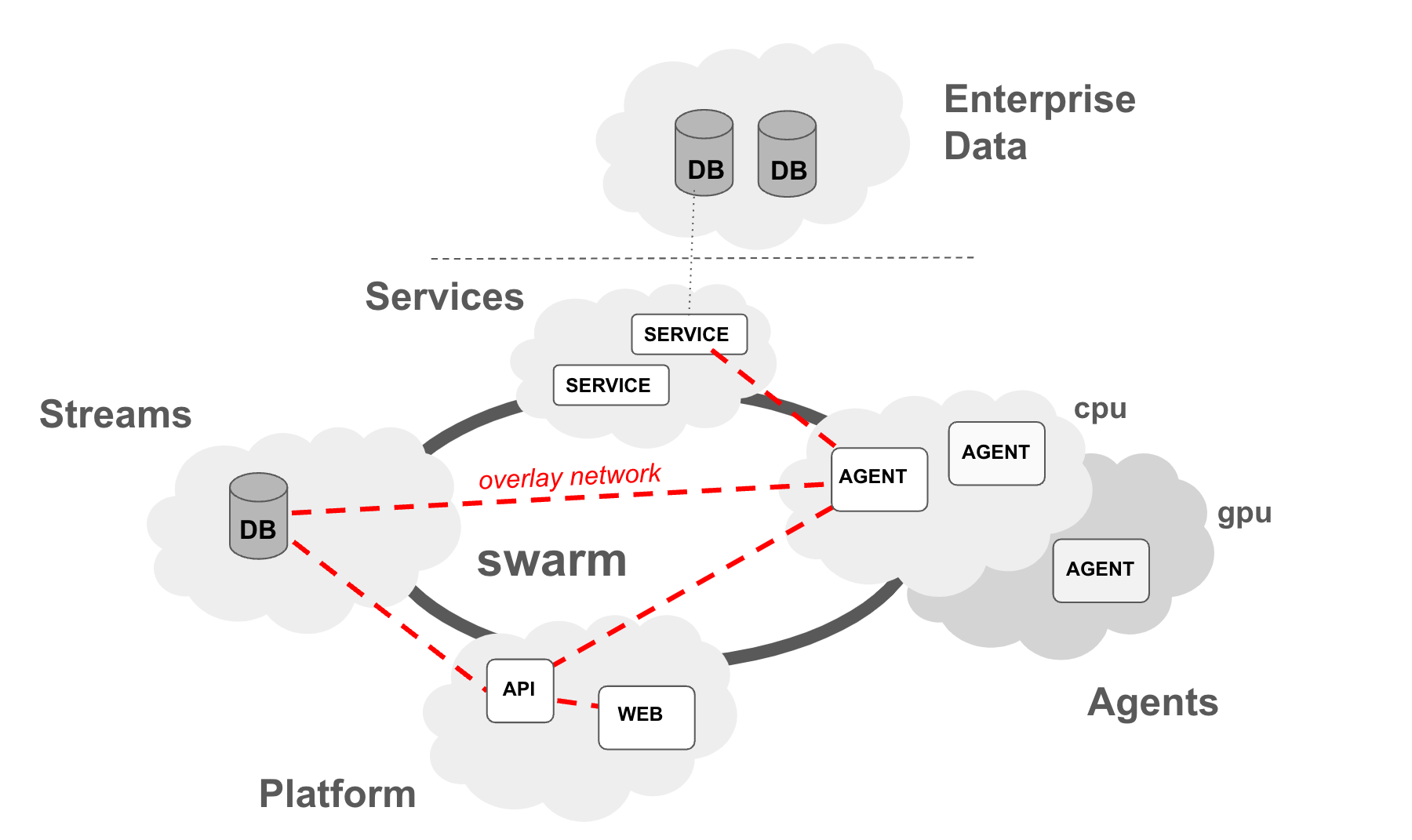
As show above at the minimum there is a cluster of four compute instances, labeled platform, db, agent, and service.
The mapping various components to the compute cluster is done through deployment constraints (see below swarm setup). In the current setup the cluster has nodes with labels: db, platform, agent, and service. Redis container is deployed on the db nodes, API and frontend deployed on the platform node, agent containers are deployed to the agent node, and finally any service that can be used by agents is deployed on service node. Communication between the various components is done through an overlay network dedicated to the plaform. The overlay network enables easy communication among components with components simply reachable through their service names (see https://docs.docker.com/network/drivers/overlay/)
For larger deployments and complex scenarios, multiple nodes can be designated to each function, and one can introduce different labels to define complex deployment targets (e.g. cpu, gpu, etc.)
Each deployment of the platform is named, with a separate network so that each component in the platform is addressible using the same hostname within its specific overlay network.
requirements
As in the localhost deployment mode, the swarm deployment of blue also requires docker engine to build and run the infrastructure and agents. In addition, docker swarm is used for creating a production infrastructure and docker hub is used as a repository of docker images.
setup
swarm setup
First, you need to create multiple compute (e.g. AWS EC2) instances. For this step, please refer to your cloud providers documentation. For AWS, you can find it here: https://aws.amazon.com/ec2/getting-started/. In addition, to allow some easy data sharing you can create a filesystem to share among the compute instances. For AWS EFS, refer to: https://aws.amazon.com/efs/getting-started/.
Once you have several compute instances, you can build a swarm consisting of manager and worker nodes. As part of blue platform scripts, we have convenience scripts to help you initiate a swarm, add nodes, and label them for blue deployments. For more details on swarm you can read: https://docs.docker.com/engine/swarm/
To initiate a swarm, run below command on the designated manager node:
$ cd platform/scripts
$ ./init_swarm.sh /mnt/efs/fs1/blue_swarm
Note above /mnt/efs/fs1 is the shared file system between the compute instances.
Once completed, you will have the manager and worker tokens saved as .manager.token and .worker.token. You can then usem them to go to other compute instances and join the swarm. You can either copy these files or share them via shared filesystem:
Before running below commands make sure .manager.token and .worker.token files are transferred and are in the same directory.
To join as worker, run:
$ cd platform/scripts
$ ./join_swarm.sh worker /mnt/efs/fs1/blue_swarm
To join as manager run ./joinswarm.sh manager. To leave swarm run ./leave_swarm.sh
Once all nodes are in the swarm, label them so that when blue components are deployed they go to the appropriate node. Blue uses by default four labels: platform, db, agent and service
For each node label them with one of the above labels:
$ cd platform/scripts
# ./add_label.sh <label> <node>
where
data volume setup
For the swarm mode it is best to utilize a shared filesystem as the location of the data folder. Set BLUE_DATA_DIR to a folder on such a shared filesystem. Next, to create a data volume, run:
$ cd platform/scripts
$ ./create_data_volume.sh --platform default
This will create a directory called default under the $BLUE_DATA_DIR directory, and create a volume on that directory.
data volume contents
In the default configuration some of the components of blue require data and models, stored in the data volume. Below are the steps to put them into the volume you just created:
$ cd $BLUE_INSTALL_DIR/platform/setup
$ ./build_setup.sh
$ cd $BLUE_INSTALL_DIR/platform/scripts
# ./setup_data_volume.sh
build
In swarm mode, build instructions are the same as in localhost mode. You can follow the same build instructions.
deployment
To deploy blue on a swarm, with the default options, run:
$ cd platform/scripts
$ ./deploy_platform.sh --target swarm
To test your deployment you can run:
$ docker service ls
and the list should contain three services running: redis, api, and frontend
If you want to see it in action on the web, you can bring up the frontend by browsing to http://<BLUE_PUBLIC_WEB_SERVER>:BLUE_PUBLIC_WEB_SERVER_PORT and the API documentation on http://<BLUE_PUBLIC_API_SERVER>:BLUE_PUBLIC_API_SERVER_PORT/docs#/
</br>