blue
Agents
Below you will find more information on developing your own agents as well as a list of template and generic agents that you can use as a template and learn from.
Use below links for quick accces:
</br> </br>
library
To install blue-platform (v1.0), you can run:
pip install ${BLUE_BUILD_CACHE_ARG} ${BLUE_BUILD_LIB_ARG} blue-platform==1.0
Unless you are developing both BLUE_BUILD_CACHE_ARG and BLUE_BUILD_LIB_ARG should be empty, in other words:
$ pip install blue-platform==1.0
Please replace the version number above with the specific version you would like to install.
If you installed blue through blue-cli you already have blue-platform installed.
It is highly recommended that you use a virtual environment before installing blue-platform.
basics
Let’s dive into a bit of development of the agents, starting with basics…
The blue-platform library contains an Agent class that can be used as a base class for developing new agents. While it is often the practice to use Agent class as the base class, however, you do not necessarily need to extend the base class as you can simply use the Agent class directly, and pass in different parameters (such as processor function to process data).
Let’s first go through an example that basically uses Agent class directly.
We will walk through the source code of the basic example.
Once you install the blue-platform, you should pip install other requirements:
$ cd ${BLUE_INSTALL_DIR}/agents/basics
$ pip install -r requirements.core
$ pip install -r requirements.agent
Then, you invoke can invoke a python interpreter:
$ python
First, import Agent and Session:
from blue.agent import Agent
from blue.session import Session
Initially, let’s turn off a lot of the logging, by settting logging level to ERROR:
logging.getLogger().setLevel(logging.ERROR)
In this example, let’s first create a session, then have a USER agent, simply using the existing Agent class, input some text using the interact function of the Agent class.
# create a session
session = Session()

prefix = session.cid + ":" + "AGENT"

# create a user agent
user_agent = Agent(name="USER", prefix=prefix, session=session)

# user initiates an interaction
user_agent.interact("hello world!", eos=False)
user_agent.interact("i am an agent")
In the above code, USER agent sends two interactions (messsages). In the first interact function eos is set to False so that the USER ouput stream doesn’t contain and EOS (End Of Stream) message, yet.
Now, let’s create a COUNTER agent, again using the base Agent class. The counter agent will listen to the streams in the same session as the USER agent. Then, we define a processor function to process stream data.
The signature of the processor function is (message, input=None, properties=None, worker=None). message is the message received from the stream to process, input is the input parameter name, default is DEFAULT. properties is the agent properties, and finally worker is the specific worker instance, which will be automatically set.
Let’s write below code to create a COUNTER agent with a custom processor function as below:
# sample func to process data for counter
stream_data = []

def processor(message, input=None, properties=None, worker=None):
    if message.isEOS():
        # print all data received from stream
        print("Stream Data:")
        print(stream_data)
        # compute length of the stream data
        l = len(stream_data)
        print(l)
        # output to stream
        return l
    elif message.isData():
        # store data value
        data = message.getData()
        print(data)
        stream_data.append(data)
        return None

# create a counter agent in the same session
properties = {
    "listens": {
        "DEFAULT": {
          "includes": [
            "USER"
          ],
          "excludes": []
        }
      }
}
counter_agent = Agent(name="COUNTER", prefix=prefix, properties=properties, session=session, processor=processor)
And run it:
$ python test.py
hello world!
i am an agent
Stream Data:
['hello world!', 'i am an agent']
2
As you can see from the output above, two DATA messages are received, followed by an EOS message (a CONTROL message). When the output stream is created it automatically injects a BOS (Begin Of Stream) message but for the purposes of this example, we are ignoring it. Once the EOS message is received, the processor functions computes the length of all the data in stream (accumulated in stream_data variable) and returns the result (and thereby outputing the result into a new stream)
Now, if you like you can turn on logging level to INFO and see a lot more of what is happening:
logging.getLogger().setLevel(logging.INFO)
</br> </br>
data processor
As you have seen above, the processor function is called on each message in a stream to process and as such developing the processor function is the key to defining an agents behavior.
The typical pattern of processing is as below:
if message.isBOS():
   # initialize
elif message.isData():
   # process data in message
elif message.isEOS():
   # aggregate, return result
   return result
Upon processing the messages from stream and performing agent-specific computation, the agent can output its result into a new output stream(s) for further processing by other agents. An agent can do so either by returning the result in processor function (as shown above). or by using the worker instance (passed on to the processor function as a parameter) to write to streams (e.g. worker.write_data(3)).
processor can return data either as a singleton of type int, float, str, or dict. The message content_type is automatically set based on the type of the data returned, i.e. INT, FLOAT, STR, or JSON
processor can also return data in a list. In this case, each element in the list is written to the stream separately.
worker has a number of function that can be used to write to streams: write_bos, write_eos, write_data, write_control, and write. write_bos and write_eos functions are shorthand to output BOS and EOS control messages. write_data takes a data parameter and outputs a DATA message, e,g. write_data(3), write_data("hello"), write_data({'a': 3}). write_control take code and args parameters and outputs a CONTROL message. Finally, write function outputs any message.
Each of these functions also take optional parameters: output="DEFAULT", id=None, tags=None where output is the output parameter name, id is an additional specific identifier on the output parameter, tags specify additional tags that can be set on the output stream, in addition to tags defined by the output parameter tags (see below parameters).
Note messages in a stream can also be control messages. If an agent want to process such messages, they can do so, as shown below:
...
elif message.isControl():
   # process control message
...
See messages for further details on messages and more.
input is a parameter to the processor function. As agents can have multiple input parameters, if a stream is identified to be a particular input parameter, input parameter will be set to the name of the input parameter. See below parameters to see how can identification is made, as part of input parameter specification.
properties is another parameter to the processor function. It is essentially an agent’s properties, which can be used in processor function to define the behavior of the computation. properties is essentially a dictionay object (can be nested) and specifici properties can be obtained simply by properties[<property>], e.g. properties["model"]. See below properties for common and agent-specific properties.
</br> </br>
parameters
Each agent can define any number of input and output parameters. While processor function consumes one input at a time, input parameter specifies which input parameter the data corresponds to. When returning results from the processor function data return can automatically go into the DEFAULT output parameter, or you can use various write functions to specify a particular output parameter. All agents by default have a DEFAULT input parameter and DEFAULT output parameter.
Input and output parameters can either be specified as part of the agent properties or separately through add_input and add_output methods.
input parameters
Input parameters to an agent determines specific data to be processed by the agent.
Input parameters can be specified as part of the agent properties as below:
"inputs": {
    <NAME>: {
        "name": <NAME>,
        "description": <DESCRIPTION>
        "properties": {
             "includes": [],
             "excludes": []
        }
    }
}
includes and excludes are list of tags (or tag regular expressions) to trigger the agent to listen to the stream based on its tags and invoke the processor.
Input parameters can also be specified programmatically, through add_input(name, description="...", includes=[], excludes=[])
So, in the above specification the includes list contains a list of regular expressions that are matched against stream tags. For example, above .* matches any sequence of characters, as such includes matches any tag. The excludes list similarly contains a list of regular expressions. In the above example though the list is empty, as such there are no exclusions.
The mechanism of listening is as follows, with more details:
Agents tag each stream they create, as you have seen above, USER agent tagged its output stream as USER. Agents by default tag each stream they produce by their own name. Additional, tags can be provided as a property (tags) of the agent output parameters, or at the time of creating a new stream (see data processor worker.write function tag parameter).
Other agents in the session check if their includes and excludes list against the tags of the stream. includes and excludes lists are ordered lists of regular expressions that are evaluated on stream tags. To decide if a stream should be listened to, first the includes list is processed. If none of the regular expressions is matched, the stream with the tags is not listened to. If any of the regular expressions is a match, a further check is made in the excludes list. If none of the excludes regular expressions is matched, the stream is listened. If any one of excludes is matched the stream is not listened to.
output parameters
Output parameters of an agent determines specific data to be output by the agent. Outputs define default tags associated with the stream.
Output parameters can be specified as part of the agent properties as below:
"outputs": {
    <NAME>: {
        "name": <NAME>,
        "description": <DESCRIPTION>
        "properties": {
             "tags": []
        }
    }
}
Output parameters can also be specified programmatically, through add_output(name, description="...", tags=[])
messages
In blue there are two types of messages: DATA and CONTROL. Messages have three parts: (1) label, either DATA of CONTROL (2) contents, serialized content of the message, and (3) content_type, either INT, FLOAT, STR, or JSON.
For DATA messages its content is the data itself, for example, 3 or “Hello”. For content of type JSON, contents is the string version of the JSON object.
For CONTROL messages its content is: (1) code, specific control code, (2) args JSON object containing arguments for the message. content_type of CONTROL messages is always JSON. Besides BOS and EOS, there are other control codes such as
JOIN_SESSION in platform streams ADD_AGENT, REMOVE_AGENT, ADD_STREAM, in session streams, and EXECUTE_AGENT, CREATE_FORM, UPDATE_FORM, and CLOSE_FORM in agent streams.
Message is a python class, that can be imported from blue.stream import Message. It has a number of utility functions, to determine the type of message, such as isData, isControl, isBOS, isEOS, get parts of the message such as getLabel, getData, getContents, getContentType, getCode, getArgs, and getArg.
Additionally when a message is received from the processor function it additionally has an id and stream, capturing id of the message and the id of the stream it resides. These can be obtained through getID and getStream functions.
When returned from the processor function, message object itself can be used, for example:
return Message.EOS
return [3, Message.EOS]
</br> </br>
properties
Agents have a number of system specific properties as well as custom agent-specific properties. In the basic example, if you were to print the properties in the processor function, you would see:
{'db.host': 'localhost', 'db.port': 6379, 'instructable': True, "inputs": {...}, "outputs": {...} }
Above db.host, db.port would be system specific and set outside the context of agent, as part of the platform deployment.
There are also generic properties such as inputs and outputs that are defined for each agent specifying which streams to listen to and how to tag output streams based on input and output paratemeter specifications. instructable is another generic property, which states that this agent can be instructed to execute externally by another agent (such as planner). See instructable agents for more details.
Beyond that any property is agent-specific and can be set to any key, value pair, and can be nested, as long as it can be serialized into JSON. Properties can be set hardcoded in code, set programmatically or interactively.
</br> </br>
memory
Let’s revisit the example on this page. You might have noted that stream_data is a variable, collecting all the data from the streams. When writing processor functions you would rarely do that as you might run the risk of losing computation if the worker thread dies. A better approach is to use a distributed memory that a worker can write its private data and read from.
There are three scopes of shared memory: (a) session (b) stream (c) agent. Below are API functions for reading and writing in these respective scopes. To allow this you will use the worker instance that is passed on to the processor function, as a keyword parameter, i.e.
def processor(message, input=None, properties=None, worker=None):
and use the following worker functions to write data:
For private agent-specific data, you can call the following functions on the keyword parameter worker, set_data(key, value), append_data(key, value), get_data(key), and get_data_len(key). For example, worker.set_data(‘a’, 3), and worker.get_data(‘a’). The value can be any JSON value.
To share data among agents processing data from the same stream, you can use set_stream_data(key, value), append_stream_data(key, value), get_stream_data(key), and get_stream_data_len(key).
To share data among all agents in the session, you can use set_session_data(key, value), append_session_data(key, value), get_session_data(key), and get_session_data_len(key).
</br> </br>
interactive agents
Building interactive agents, i.e. agents that present the user a graphical user interface, for example a form to fill out, is possible through a declarative UI specification. In blue we use JSONForms to facilitate that.
Essentially the agent in its responses sends back a form that describes the ui layout, data schema, and associated data. The web interface renders it accordingly. Along with the form, and event stream is created, where the processor of the agent can start consuming event from the web interface. The interactive agent then can send more messages, new user interfaces, or other events that changes the UI, accordingly.
To support interactive agent development in the web interface there is a Form Designer tool that allows you to design ui and data schemas in an interactive manner, along with the documentation.
To return a UI, simply return a CONTROL message or write an output stream, for example:
worker.write_control(ControlCode.CREATE_FORM, form, output="FORM", id=<form_id> )
where the form is a JSON object with uischema, schema and optionnaly data sections. For example:
form = {
      "schema": {
          "type": "object",
          "properties": {"name": {"type": "string"}}
      },
      "uischema": {
          "type": "VerticalLayout",
          "elements": [
              {
                  "type": "Control",
                  "label": "Name",
                  "scope": "#/properties/name"
              },
              {
                  "type": "Button",
                  "label": "Done",
                  "props": {
                      "intent": "success",
                      "action": "DONE"
                  }
              }
          ]
      }
  }
When written each form will get a unique form id, or optionally you can set the form id, by passing in an optional parameter (id=...).
Above specification would render:
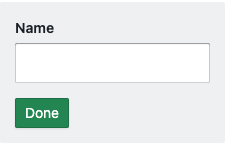
Processing events from the web interface is similar to processing any data from streams through the processor function. Event messages come as input paramter EVENT. Below is a sample:
    def processor(self, message, input="DEFAULT", properties=None, worker=None):
        if input == "EVENT":
            if message.isData():
                if worker:
                    data = message.getData()
                    stream = message.getStream()
                    form_id = data["form_id"]
                    action = data["action"]

                    # get form stream
                    form_data_stream = stream.replace("EVENT", "OUTPUT:FORM")

                    # when the user clicked DONE
                    if action == "DONE":
                        # do something
                        name = worker.get_stream_data("name", stream=form_data_stream)

                        # close form
                        form = {
                            "form_id": form_id
                        }
                        worker.write_control(ControlCode.CLOSE_FORM, form, output="FORM", id=form_id)

                    # process user input
                    else:
                        path = data["path"]
                        value = data["value"]

                        # save data on stream memory
                        worker.set_stream_data(path, value, stream=form_data_stream)
        else:
            # do something else
In the above function, events are processed, when in the input parameter is EVENT. The event messages data contains path and value, where path is a reference to the schema section of the ui, as such it refers to a specific widget. value is the value of that widget (e.g. contents of a text element). The event message also contains action. In the above code, when the action is DONE, the value of the name is retrieved from the stream memory, and a CONTROL message is sent with the corresponding form_id. Otherwise, the latest value is saved to the stream memory.
</br> </br>
instructable agents
In blue by default all agents are instructable as the default value for the property instructable is set to True. If your agent isn’t instructable you can set this to False. Other than setting the value to True you do not need to do anything specific to make your agents instructable.
An instructable agent essentially means that the agent can be made to process data from a stream by following an instruction from another agent (such as planner / coordinator agents or other agents). Any agent stream can contain such instructions.
Sending an EXECUTE_AGENT message, essentially triggers execution. An example of such an instruction is:
worker.write_control(ControlCode.EXECUTE_AGENT, {"agent": <agent_name>, "context": <context>, "properties": agent_properties, "inputs": { <param>: <stream> }})
The above instruction essentially triggers an execution on Agent with name <agent_name>, with input=<param> on stream <stream>. Context is an additional parameter, typically this can be set to session id but depending on the application logic you may want to set a different id for the context. If properties is defined then the agent overrides its default properties (on top of properties as defined in the agent registry) with the given properties.
</br> </br>
Template Agents
See the template agent and template interactive agent in the blue-example repo, to get a head-start on writing agents from a template.
Base Agents
Below is a list of agents that you can directly use as they are base agents. Also look for other agents in agents in the blue library to use them as examples.
- Requestor Agent - make requests to any API
- OpenAI Agent - make requests to OpenAI API