Getting Started
Installation
There are two Blue installations options: * Local Installation more suited for trying out and development * SWARM Deployment more suited for staging and production deployment
Login
How to login
To login:
- Open a web browser and enter the URL of your instance.
If you have installed locally and accepted the default configuration, the url will be http://localhost:3000. Otherwise, it is http://BLUE_PUBLIC_WEB_SERVER:BLUE_PUBLIC_WEB_SERVER_PORT
- Click on
Sign in with Googleand please sign in using your google account.
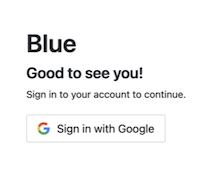
- For administrator users
Please sign in with the google account you used during the installation process. - For new users
Please sign in using a google account within the whitelisted email domain defined in the configuration BLUE_EMAIL_DOMAIN_WHITE_LIST set during the installation process. Note: by default new users are created with guest role. Administrators can grant administrator role access using Navigation menu > Users
- Home screen should appear once you have logged in successfully.
Role Based Permissions
Blue supports role based permissions. For more information please refer to Access Controls